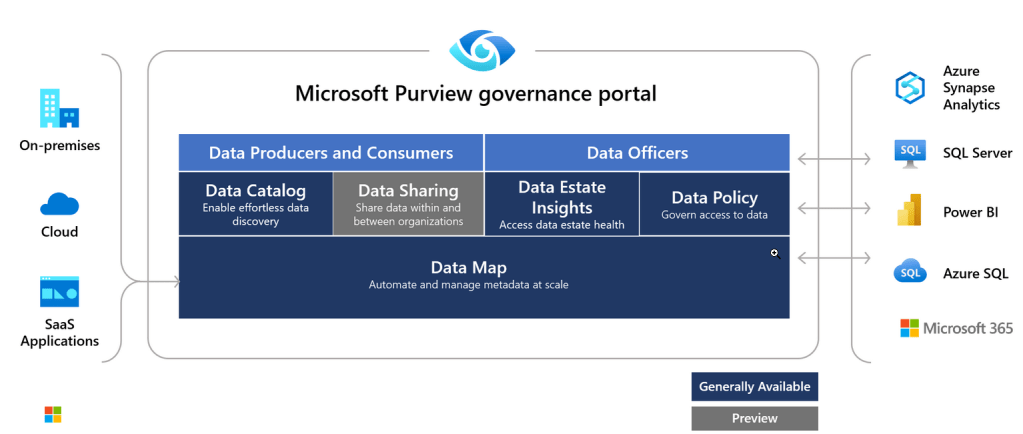
Continuing our blog series, in this post, we will explore the four services, or Apps as Microsoft’s documentation states, that are on top of the core service we already covered in the first part of the post.
Microsoft Purview: Unified Data Governance Solutions
Now that we understand how the foundational service works, we can start setting up the four Apps that will provide the extra functionalities we need in order to support our data governance strategy.

Microsoft Purview services/Apps
Data Catalog App
This is probably one of the most important Apps of the unified service. It is the face of the product for our business users. The Data Catalog is the App that allows us to interact with our data-asset inventory, which was created by the Data Map service. All that metadata we extracted through our Scans is the input for the Data Catalog.
The primary feature of the App, must be, and is, the ability to search and find any data assets in an easy and intuitive manner. The starting point for this is the Home page of the App where you will be able to use the Search Bar:
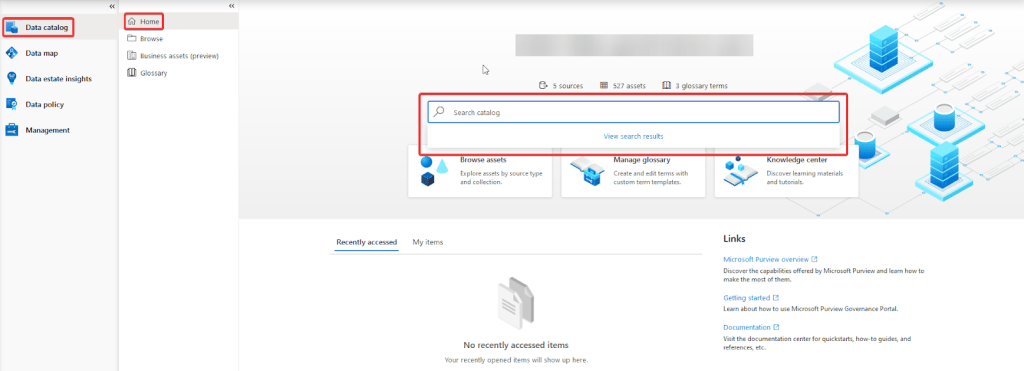
Now, before you can start exploring all the data assets, you must belong, at least, to the Data Readers role in one Collection. The role assignment will grant you immediate access to the Microsoft Purview Governance Portal.
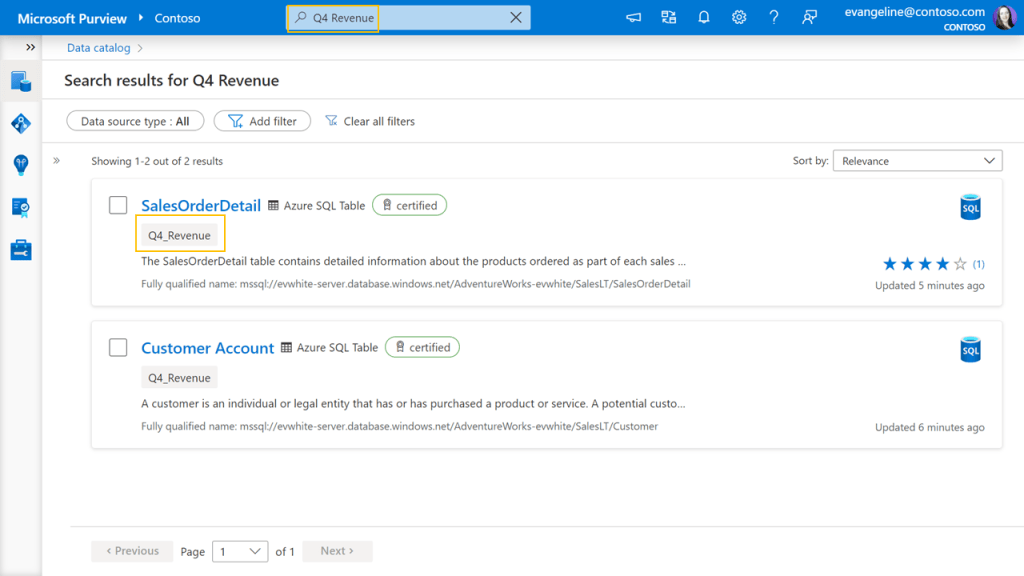
Once you have read access to at least one Collection, you can type * in the Search Bar to list all the available data assets within the Collections you have access to.
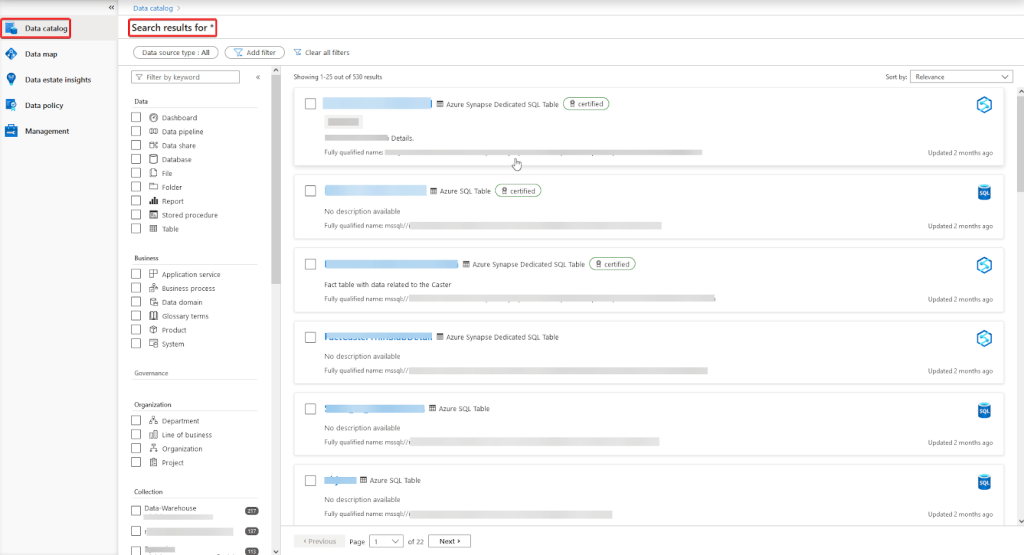
The Results page will offer you two ways to filter your search even more. One is by using the Facets on the left panel:
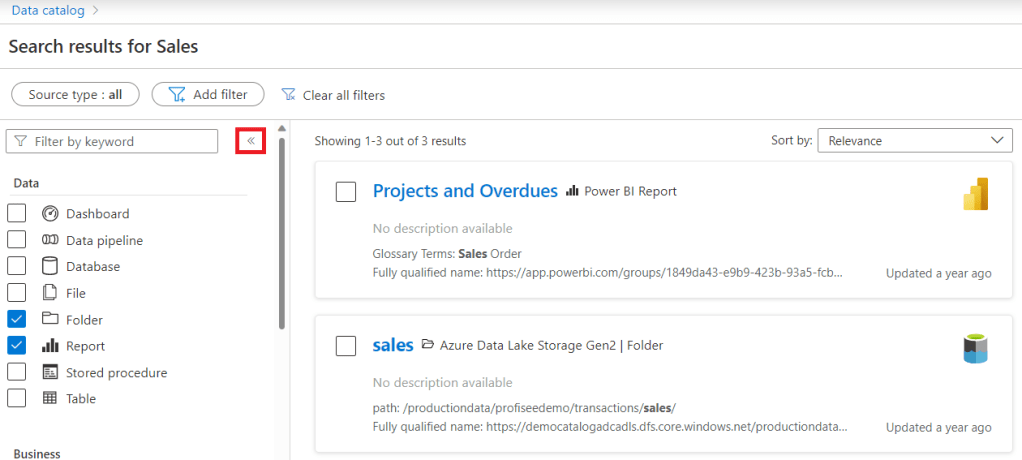
You can filter the results by the object type, the Collection name the data assets belong to, the classification (e.g., Australia Passport Number), and other properties of the data assets that we will cover later, such as a Business Glossary term or a Label.
The second way to narrow your search is by using the Filters, which are located at the top of the results list:

You can filter by properties such as a Managed Attribute, the source type, a Tag, or the Activity of the data assets (created within or updated within).
After filtering and finding the data asset you are looking for, you can click on it to access its properties. For instance, if we click on an AZ SQL Database table, we will be able to see properties such as its description, the Managed Attributes related to it, its columns and the classifications they fall into depending on your Classification Rules, its contacts (useful to business users, so they know who to reach out to when they have questions about the data asset), related data assets, and its lineage, among other details.
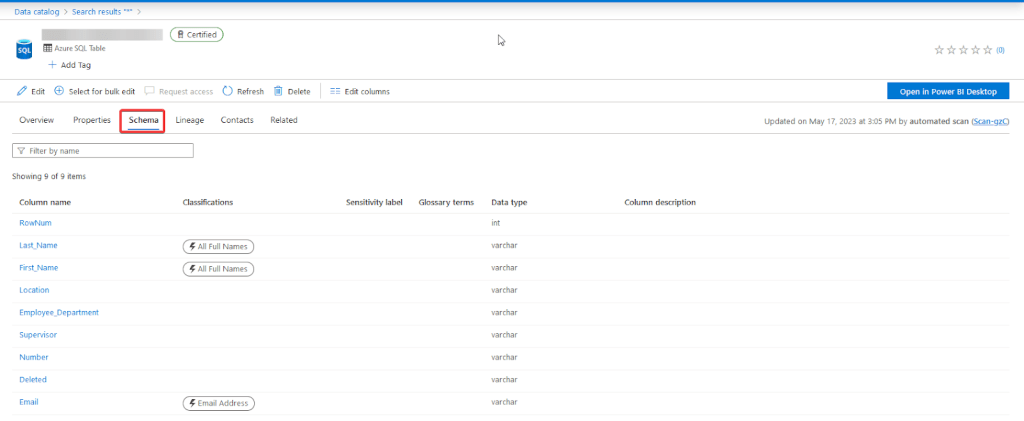
One thing I would like to highlight that is currently not available, at least for an AZ SQL Database table, is the ability to identify and flag the primary key of a table as such. This is a key feature that should have been included in the product from the beginning, as business users will not have a way to know how to identify unique records from an AZ SQL Database table. A stone in their shoes, if you ask me. They would have to ask the Contacts related to the data assets, and, from my perspective, this could be a bummer for the business users when it comes to adopting a self-service culture.
The App has some other features that are worth mentioning:
1. Data Lineage
Lineage is a key feature when it comes to understanding where your data comes from, what has happened to it, and how it is consumed, among other details.
In terms of this feature, the product supports different systems, such as Power BI, Az Data Factory, Az Synapse Analytics, Google BigQuery, Snowflake, Looker, SAP ECC, among others.
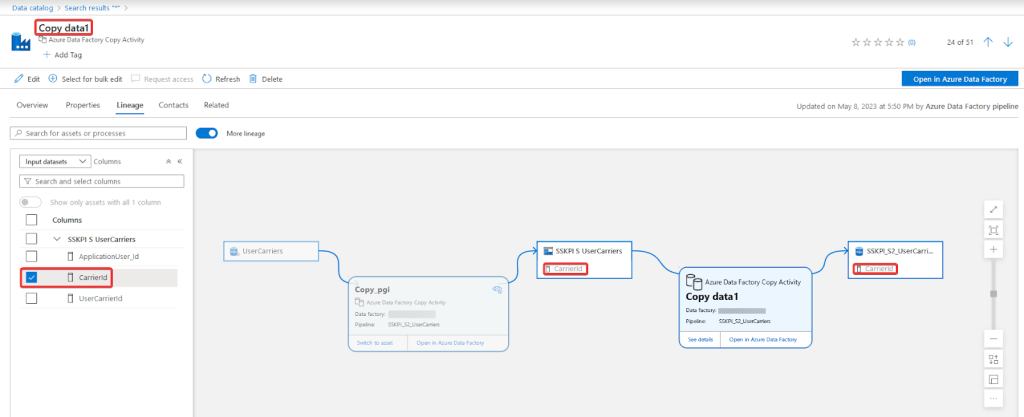
In the following image, we can see an example of an Az Data Factory Copy Data activity lineage and how a column from a table flows across two different Copy Data activities:
2. Business Glossary
Usually, the metadata of your data assets does not reflect the jargon or common terminology used within an organization. I have seen table names and their columns follow some weird naming conventions that only the owners of the system are able to understand. This is a common practice, and can be a headache for non-technical users when they start working with these tables. In this scenario, the Business Glossary could be a lifesaver, especially for new business users who still do not understand all the details of the organization.
The Business Glossary allows you to create a glossary specific to your organization’s context. Terms can be related to an asset at the asset level itself or, if we are talking about a database table, at the column level. This feature will not only enrich your metadata but also help your business users find data assets in a more efficient way.

3. Managed Attributes
Another option to provide context to your data assets are the Managed Attributes. They can be grouped to be managed in an easier way, and they can be set as mandatory; when a data asset is edited, the required attribute must be filled out before you can close the editor.
And they can also be used to narrow your search in the Data Catalog.

3. Tags
If you need to add informative labels to your data assets in a quick and informal way, Tags are the way to do this. Add any label you think will facilitate the search of the data assets.
Data Sharing App
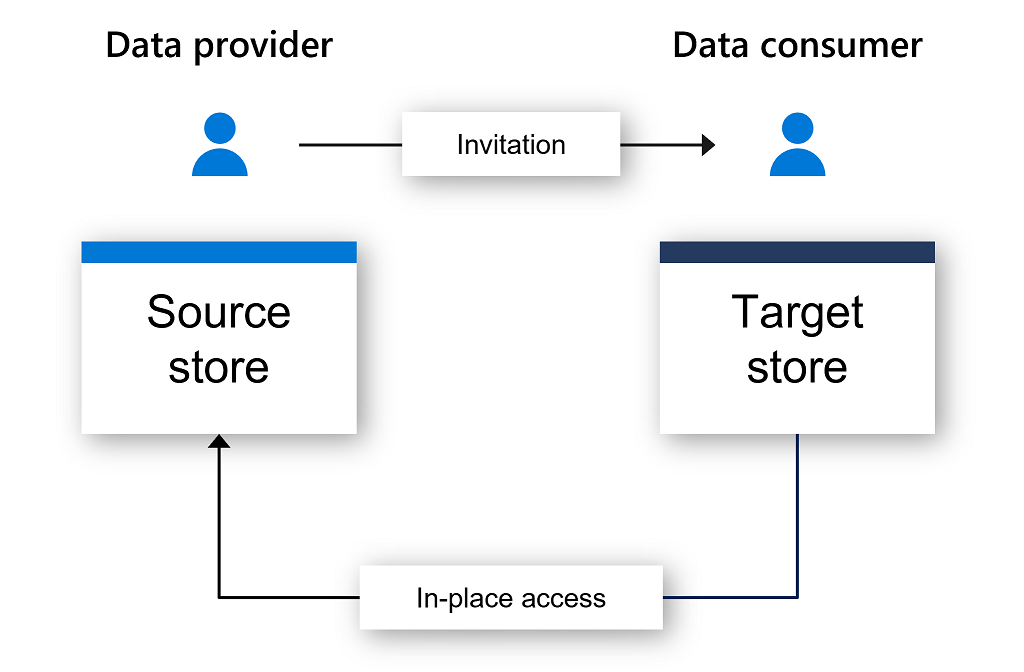
This App is in preview, and it allows you to share data in a near-real time fashion between two Az Storage Accounts in a secured way without duplication of the data. You can track what data is being shared and remove access at any time.
Data Estate Insights App
Keeping track of all the data assets an organization has can be exhausting, but with good planning, organization, and the right tool, it can be achieved. This App is focused on supporting this. Metrics related to all the metadata extracted from your different sources can be found here. From knowing how many assets fall under each of your Classification Rules, to understanding what the top searches of your business users are within the Data Catalog, are some of the insights you could get by using this App.

Data Policy App
This App centralizes a key feature: data access. It has three main features, but we will only review two of them:
1. Data Owner Access Policies
This is the core feature to support the implementation of a self-service culture in an organization that plans on using Microsoft Purview: Unified Data Governance Solutions, and it is also in preview. It will enable your business users to request and get access to your data assets in an automated and, as the name suggests, self-service fashion. There is no middle man for this task, which is awesome and a feature of great value for business users.
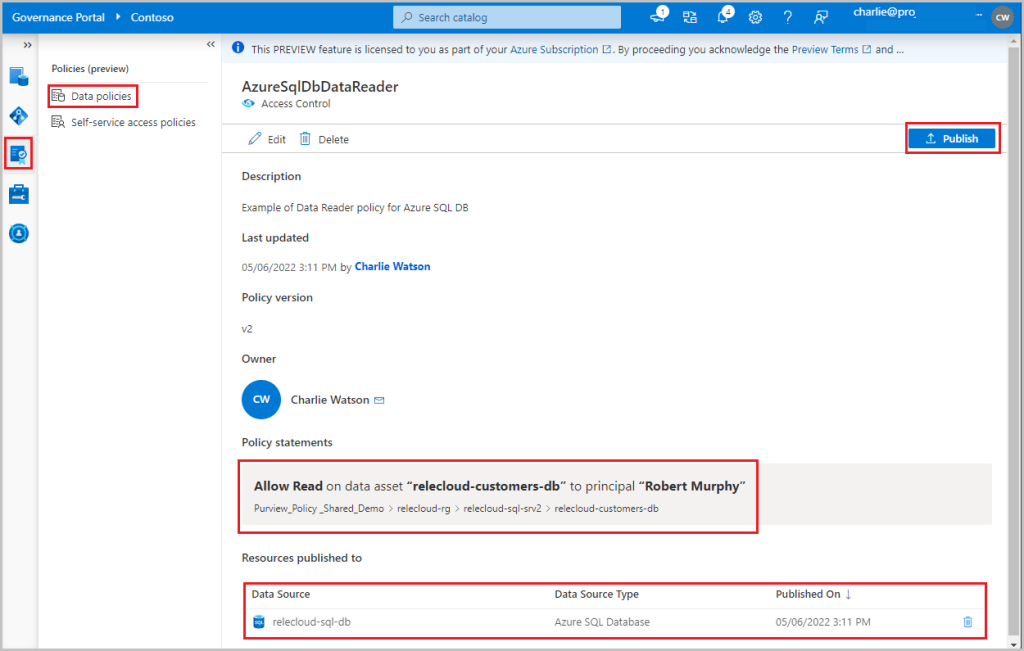
Even though it is in preview, it is working fine, at least per my testing. I was able to grant access to a user, and within five minutes the permissions took effect.
2. Self-Service Access Policies
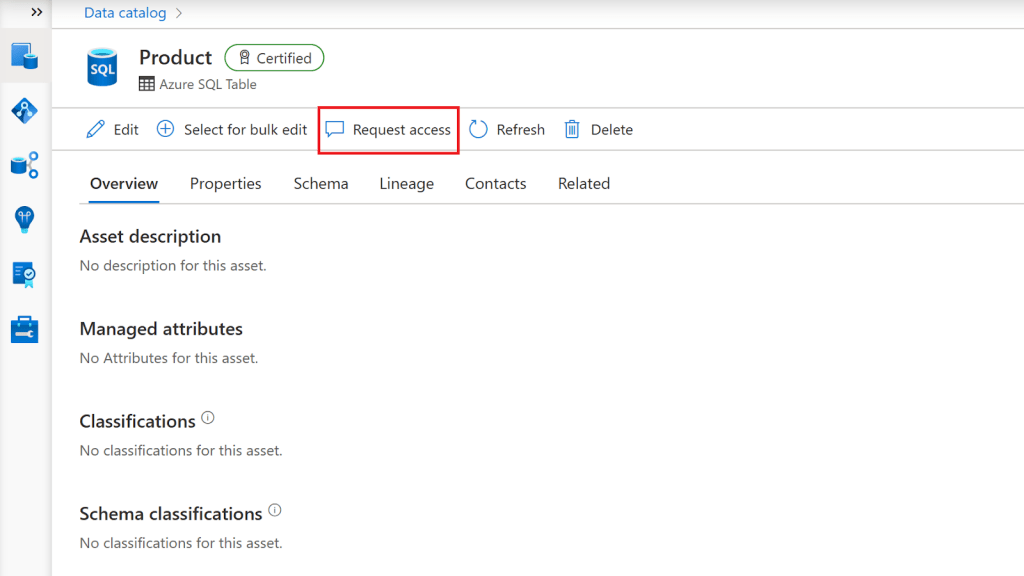
This is the core feature to support the implementation of a self-service culture in an organization that plans on using Microsoft Purview: Unified Data Governance Solutions, and is also in preview. It will enable your business users to request and get access to your data assets in an automated and, as the name suggests, self-service fashion. No middle man for this task, which is awesome and a feature of great value for the business users.
Summary
In this blog series, we explored the different features that Microsoft Purview: Unified Data Governance Solutions has to offer. We were able to see that the product still has a long way to go before it can be considered mature. This is not only because several of its features are still in preview, but also because there are still some features that need to be improved (e.g., identification and flagging of primary keys for database tables – at least for Az SQL Databases) and developed if they do not want to be defeated by other similar and more mature products.
Nevertheless, the service is on a good path, and for organizations with basic needs in terms of data governance, this could be enough. In fact, this was actually the case for the company for which I did the PoC which allowed me to know the service better. After doing a presentation and showing all the features and how they actually work, it was decided that the service offers what is needed at the moment and what they foresee will be needed. On the other hand, they are also confident that Microsoft, one of its main partners, will improve the service in the short and medium term.
 Tech & more blog
Leave a comment