In this article I will share how I managed to cutdown the costs of AZ Data Factory’s Cloud-Data-Movement Meter for a specific scenario I had to face. I will explain how this meter is calculated and how we can estimate the execution of a pipeline by using the AZ Pricing Calculator.
I split the article in several sections to make things a bit easier to understand. Enjoy the reading 😉
1. Pre-Requisites
These are the concepts you need to be familiar with to understand better the article:
- Az Data Factory
- Integration Runtime
- Self-Hosted Integration Runtime
- Pipelines and activities
- Types of activities – Data Movement activities
2. Scenario
I received an email from the client asking if there was a way to reduce the cost of one of our AZ Data Factory instances. This is how much it was costing to the client in the last 6 months:

If we go deeper into the details of 2022-04’s costs, we see that the Cloud Data Movement meter is the one with the highest cost. I reviewed the other months and I saw the same pattern accross them.

A this point I did not have a clue about what could be causing the high cost, so I started digging into the pipelines and found the following:
- Pipelines execution schedule:
- 21 pipelines are executed every 10 mins 24×7
- 2 Pipelines are executed every hour 24×7
- 4 pipelines are executed at every day at 06:00 UTC
- 29 pipelines are executed every day at 11:00 UTC
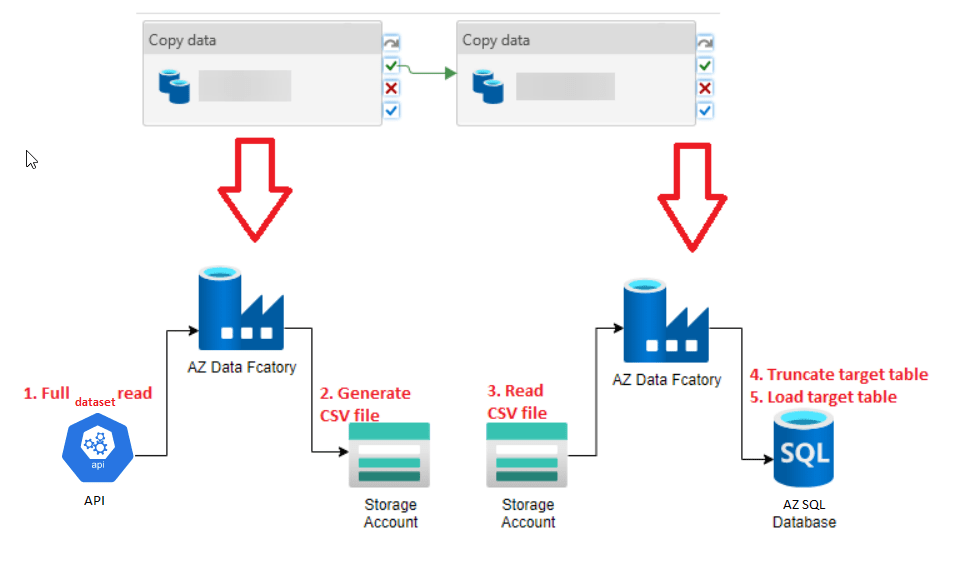
- Common pipelines’ logic/load pattern: Basically all pipelines were following the load pattern you see in the image below and the final target tables did not have any type of constraints such as primary keys or foreign keys and, they were not referenced by any other object within the database such as a Stored Procedure or a View; they were basically isolated tables. I also noticed that most of the source tables did not have a way to know if a record was inserted/updated, so an incremental approach could be implemented. Finally, all reports that were accessing the final tables were doing so by using SQL users that had the db_datareader role, which means that they could read all the tables in the database.
3. What did I need to understand before getting to the solution?
3.1. Cloud Data Movement Meter
This is the meter with the highest cost, so we need to understand where it is coming from.
This meter is exclusively related to the execution of Data-Movement activities. In Az Data Factory (and in AZ Synapse Pipelines) we only have one Activity under this category: the Copy Activity, which by the way, has a setting called Data Integration Units (formerly known as cloud Data Movement Units – DMU) that specifies how much power will be used to copy data. So, if the costs related to this meter are high, it is basically due to your Copy Activities.
3.2. Copy Activity – DIU (Data Integration Unit)
The DIU is a setting of a Copy Activity that represents the amount of power the Azure Integration Runtime uses to copy data. By power, I mean a combination of CPU, memory, and network resource allocation.
The setting only applies to the Azure Integration Runtime and not to the Self-Hosted Integration Runtime.
The range of DIUs goes from 2 to 256. The default value is Auto, which means that the service will determine automatically how many DIUs it will use to move data depending on the source/sink and on how much data is being processed.
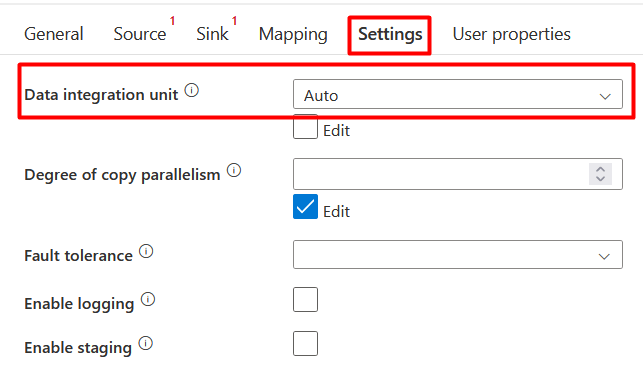
It is important to understand the DIUs as they are part of the formula to calculate how much it costs to move data by using a Copy Activity: # of used DIUs * copy duration * unit price/DIU-hour
3.3. Cloud Data Movement Meter vs. Self-Hosted Data Movement Meter
Since we might have activities that use a Self-Hosted Integration Runtime, I think it is important to understand the difference between these two meters. The Cloud Data Movement Meter is related to the Copy Activities that move data by using an Azure Integration Runtime and the Self-Hosted Data Movement Meter is related to the Copy Activities that move data by using a Self-Hosted Integration Runtime. Yes, as simple as that.
In order to know which Integration Runtime your Copy Activity is using, check the Linked Service used in the Source and Sink datasets.
For instance, if you have a delimited-text dataset, click on the pencil icon located next to the Linked Service property and check the Connect via integration runtime property. It should say AutoResolveIntegrationRuntime, which is the same Azure Integration Runtime.

If the Connect via integration runtime property says something different, it will probably be a Self-Hosted Integration Runtime, but to be sure, double check that the Integration Runtime name you see in that property is of type Self-Hosted. You can do this by going to the Manage option and then Integration runtimes, it should say Self-Hosted in the Type column:
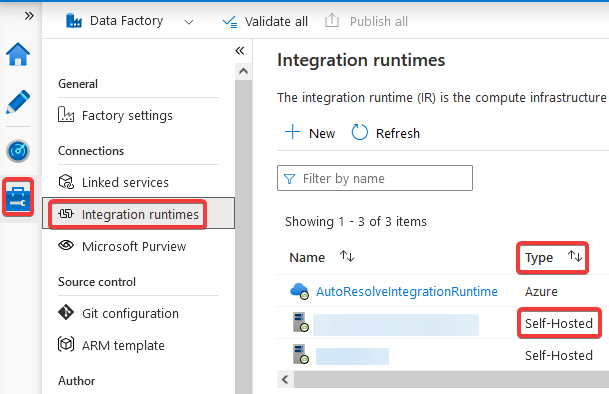
If the dataset’s Linked Service uses a Self-Hosted Integration Runtime, it means that you are reading/writing from/to a data store in a private network. All costs related to Copy Activities that use a dataset, which Linked Service uses a Self-Hosted Integration Runtime will be consolidated into the Self-Hosted Cloud Data Movement Meter instead of the Cloud Data Movement Meter.
3.4. Az Data Factory – Az Pricing Calculator
We now know what is causing the high costs, but we still don’t know what options we have available to reduce the costs and more important than that, we don’t know if these options will be cheaper than the current design. So, in order to know this, it is important to understand the basics of how Az Data Factory pricing model works and to do this, we will learn how to use the AZ Pricing Calculator, which is a feature that Microsoft offers to estimate the costs of the services it offers. Once we understand how to estimate the cost of a pipeline execution, we will be ready to know whether the options we believe will help to reduce costs will actually cost less than the current implemented design.
The AZ Pricing Calculator can be found in this link. The first thing you need to keep in mind before doing anything is this:
Prices are estimates only and are not intended as actual price quotes. Actual pricing may vary depending on the type of agreement entered with Microsoft, date of purchase, and the currency exchange rate. Prices are calculated based on US dollars and converted using Thomson Reuters benchmark rates refreshed on the first day of each calendar month.
Yes, they are estimates only and you also need to have a very good understanding of the pricing model of the service before trying to calculate a very accurate final cost. Nevertheless, the AZ Pricing Calculator does a decent job to help you estimate and understand better your costs (along with some documentation from Microsoft of course).
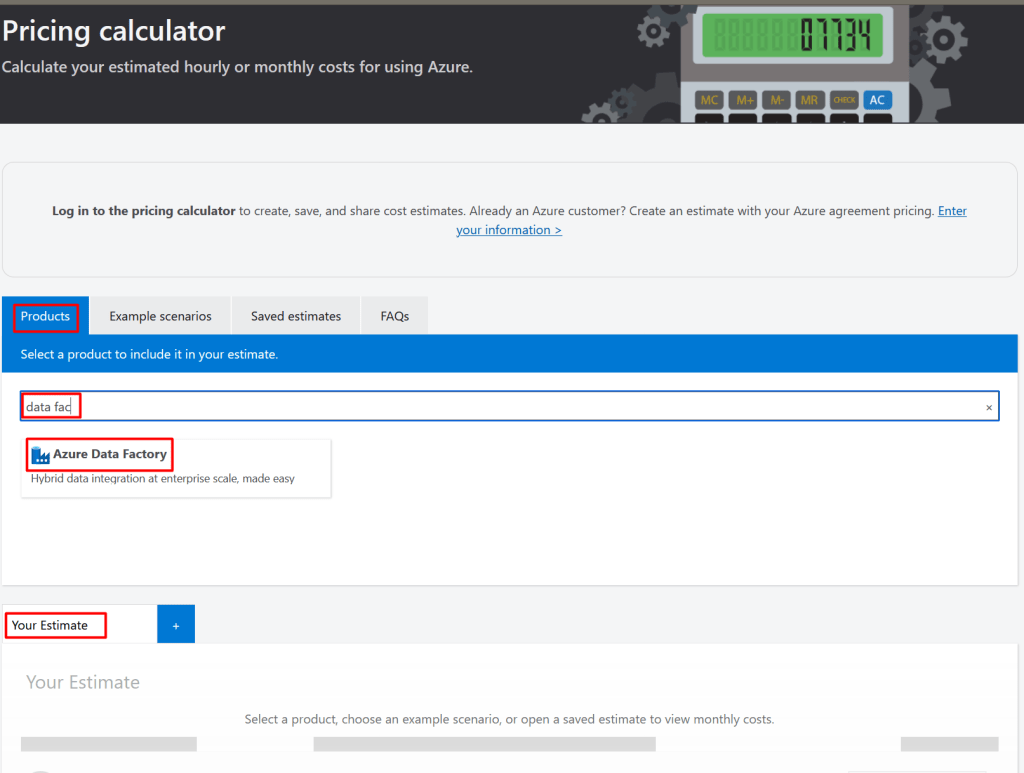
Now let’s get to the point. Click on the Pricing Calculator link, click on the tab Products, type “data factory” to look for the product within the products catalog and then click on the Azure Data Factory product link. It will load all the different operations and parameters that are used to estimate the cost of the everything you have within your Azure Data Factory instance.
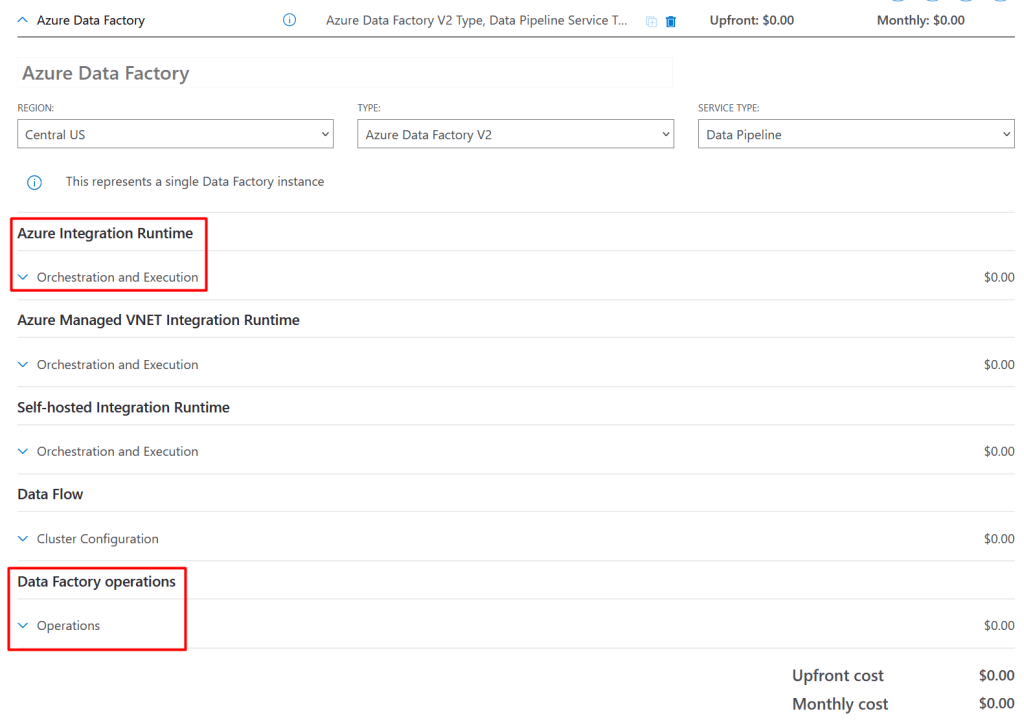
Before you go crazy with all the options thar are loaded, let me tell you that for our case we will only work with the ones highlighted in the image below; why you would ask, these are the reasons:
- Azure Managed VNET Integration Runtime: This is used to calculate the costs when you have an Azure Integration Runtime within a Data Factory managed virtual network. This is not my case
- Self-hosted Integration Runtime: This is my case; I do have some pipelines that use a Self-Hosted Integration Runtime. However, we will do the exercise with a pipeline that does not use this type of Integration Runtime. Something to add is that the pricing model of this type of Integration Runtime is the same as the one we are going to do the exercise with: Azure Integration Runtime. The only difference is the cost, all the operations executed with a Self-Hosted Integration Runtime are cheaper
- Data Flow: This is not my case. I do not have any Data Flows within any of my pipelines
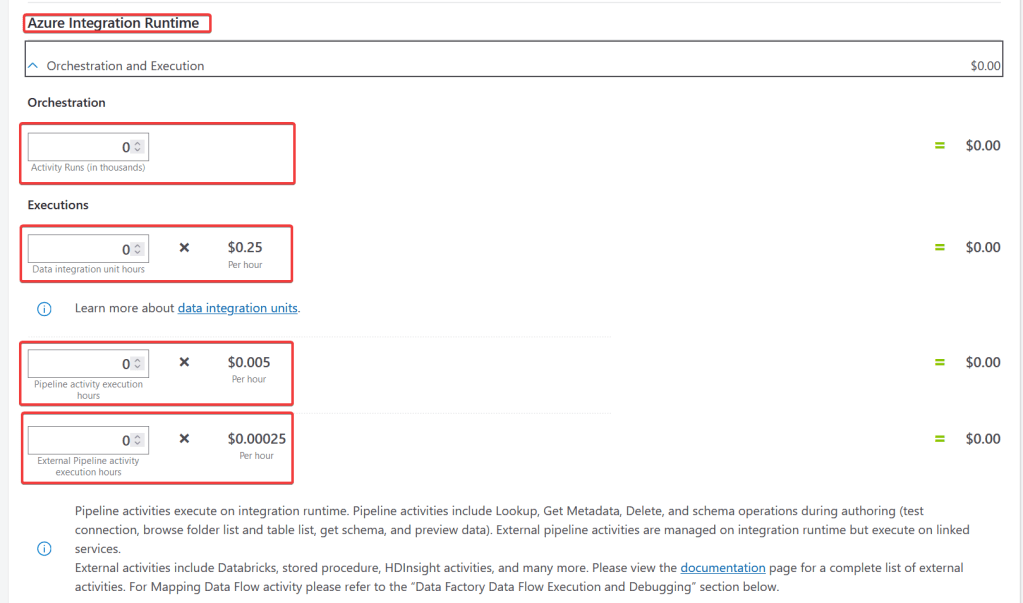
The first thing we will understand is how to map the meters we see in our costs report in the Azure Portal to the parameters we see in the calculator. Hopefully, the following image does a good job to help you understand that mapping:

*Copy and paste the image somewhere if you cannot see the details
The second thing we will understand is how we can estimate the cost of a pipeline execution. We will analyze a pipeline with the following characteristics:
- It is executed every 10 mins 24×7
- It has 2 copy activities
- It uses the Azure Integration Runtime
In the image below we will see how to estimate the cost of a pipeline execution on a daily and monthly basis:
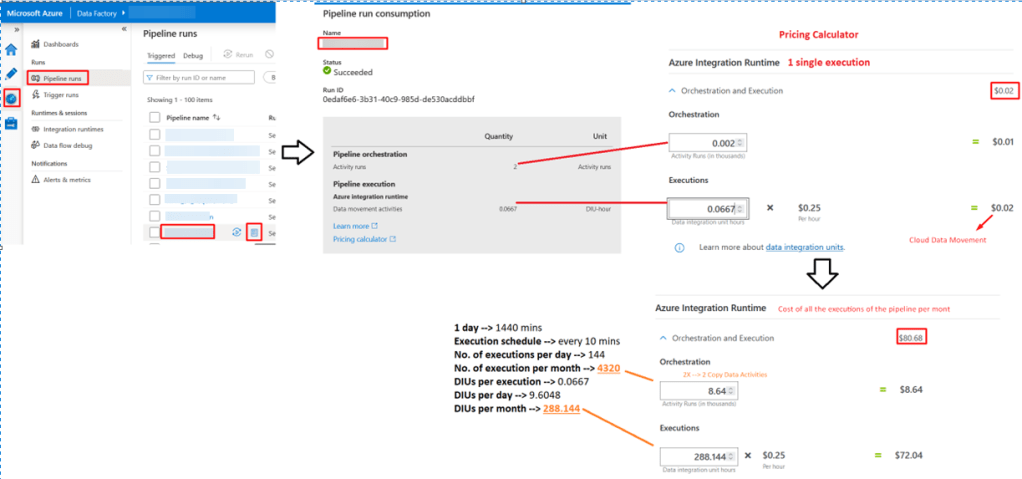
*Copy and paste the image somewhere if you cannot see the details
3.5. Conclusions after research
After understanding how a pipeline execution cost can be estimated, we can conclude that the following 3 items are having a direct impact in the cost:
- Number of Copy Activities you have in your pipelines: As obvious as it sounds, the more you have, the more expensive the execution of your pipeline will be
- How much time the Copy Activities are taking to execute: For this, the more important thing to mention is that Azure rounds up the execution time of the activities, so if your activity took 10 seconds or 59 seconds, the execution time will always be rounded up to 1 min. Analyzing how much time it is taking to read the data from the source and how much time it is taking to write the data in the target store is a good idea. Consider checking, for example, if the data source is a database, whether it is being accessed by a lot of processes/users at that moment. This will affect the time it takes to the Copy Activity to read the data. Hence, it will affect the cost of the execution
- DIUs (Data Integration Units) configuration: Most of us leave this property as Auto, which means that we are leaving to Azure the responsibility to determine how much resources should be allocated to move the data. However, there is a guideline that will help you set this property correctly; just keep in mind that the more DIUs you use, the more expensive the execution of a pipeline will be
- External Pipeline activity execution hours (check the AZ Pricing Calculator image): External activities include Databricks, stored procedure, HDInsight activities, and many more. This the cheapest type of execution, which makes total sense, as AZ Data Factory would only be dispatching the execution of the activity
4. Possible solutions – Implemented solution and why
Based on the data-load pattern explained above and what we learned about how the AZ Data Factory pricing model works, we could consider the following solutions:
- Load data returned from the API call into the final target table: This would be the cheapest option as it would only require to have one single activity, which source would be the API call, the sink would be the final target table and we would keep the TRUNCATE statement of the final target table in the pre-copy script property (this was originally implemented like this and it is not recommended because the pre-copy script gets executed no matter if the read of the source is successful or not. You might end up with an empty table until your next execution)
- Load data returned from the API call into a staging table and call a Stored Procedure to do a TRUNCATE-and-load operation: This would be cheaper than the original design because we would have one Copy Activity and one Stored Procedure Activity, which is an external activity; the database is the resource, which would be using its compute power to do the final step of loading the data into the final target table. Nevertheless, we would still be doing the TRUNCATE on the final target table, which means that the table would be empty/incomplete during the time the activity is loading the data into the table. A final user might be trying to access the final target table or accessing a report that queries this table and he/she would be seeing incorrect data or even no data at all
- Load data returned from the API call into a staging table and call a Stored Procedure to do a table swapping operation by renaming the staging table and final target table: This would be cheaper than the original design because we would have one Copy Activity and one Stored Procedure Activity, which is an external activity; the database is the resource, which would be using its compute power to do the final step of doing the table swapping, which is not a high/intense operation for the database and it should happen really quickly
So, considering the following:
- We are short of time (as always), we want to reduce costs as quickly as possible
- We want to implement a solution that does not take too much effort and works. This AZ Data Factory instance will be migrated and redesigned, it’s not worth trying to do a full redesign of the pipelines
- All reports that were accessing the final tables were doing so by using SQL users that had the db_datareader role, which means that they could read all the tables in the database
The solution that was implemented was the # 3 because:
- I’m meeting the main goal of the problem: Reduce the costs of AZ Data Factory
- I’m also reducing the cost of the storage account: Since we are not writing a CSV file and reading it to load it into the final target table anymore, we are not getting charged for these operations
- I’m adding what could be considered a small improvement: At no moment the final user might be seeing incorrect data or no data at all. If a user were accessing the reports that read these final tables at the exact moment that the database is doing the table swapping, he/she would be experiencing a lock for a small time, but it would be a really small time
- It works: It is worth mentioning that there is no perfect solution. Every solution has its cons and pros. For me this solution was perfect considering the specific conditions of the scenario. For other scenarios, this might not be even an option to consider
If you’re wondering how much we saved on our first month after implementing the solution in the pipelines, this is how much:
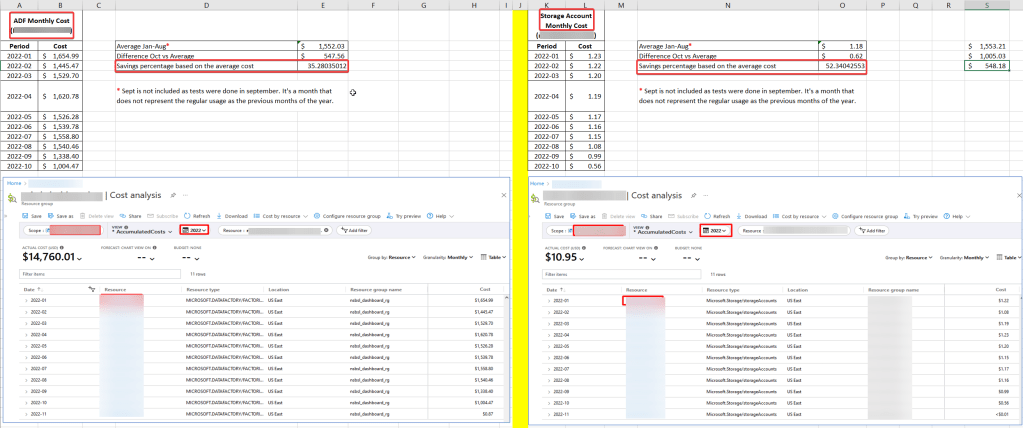
*Copy and paste the image somewhere if you cannot see the details
5. References
These are some good links that I read, check them out if you would like to learn more details related to the topic:
- Examples for better understanding pricing model under different integration runtime types
- Plan to manage costs for Azure Data Factory
- Copy Activity properties – Data Integration Unit definition
- Copy Activity settings – Data Integration Unit – Performance features
6. Final comments
I hope you liked my first article and that you learned from it. If there is anything you see that is incorrect or not clear enough, please do let me know in the comments. Thank you!
 Tech & more blog
Leave a comment